AquaSWMM

EPA SWMM's own results, in a modern desktop editor.

AquaSWMM draws, edits and runs your SWMM 5 models on the engine EPA publishes, unmodified. The numbers in your report are the numbers EPA's engine wrote, so a reviewer is not being asked to trust a new solver.

Windows, macOS and Linux. The trial needs only an email address — no card — and includes full support.

Run Status Run finished and wrote results

Engine
EPA SWMM 5.2.4
Binary SHA-256
544e9f3da80577daf8f7beed8188d8d8788b3675cb49a82e8c71bef76a461c97
Runoff continuity
−0.023%
Flow routing continuity
+0.092%
Errors / warnings
0 / 0
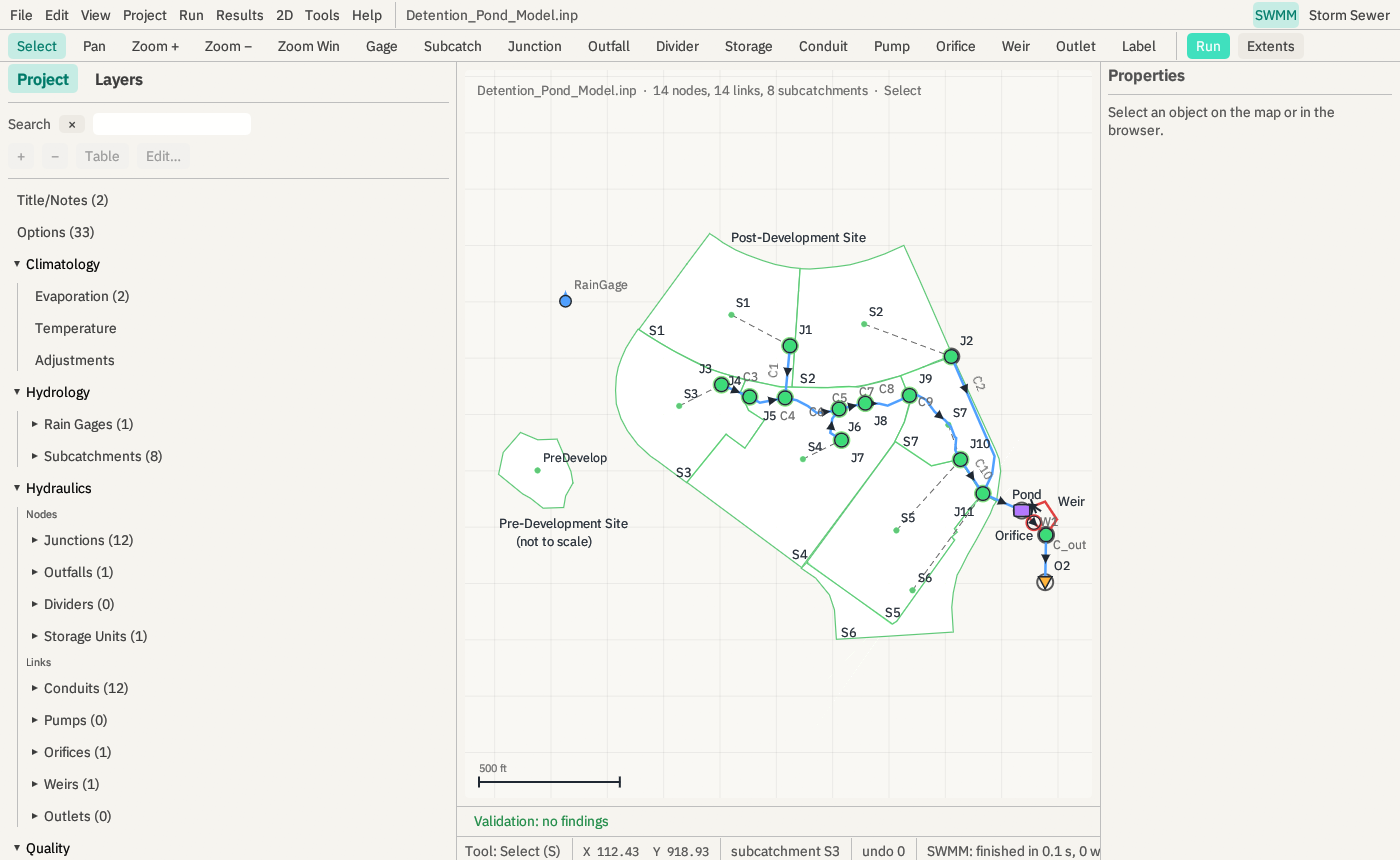
Every run is stamped with the engine's own reported version and the SHA-256 of the executable that ran, and the model report prints both. Values from a run of EPA's Detention Pond sample model.
The AquaSWMM SWMM editor with EPA's Detention Pond sample model open: project browser on the left, the model drawn on a map with subcatchments, junctions, the pond, orifice and weir, and a status bar reading SWMM finished in 0.1 s.
The SWMM editor after a run of EPA's Detention Pond sample model. Screenshot from the app, unretouched.

One program for the whole SWMM job

Build and check the model, run it on EPA's engine, put flooding on the ground, size the pipes and hand in the report. Every feature below is in the current release and documented chapter by chapter in the manual.

A SWMM editor that keeps your file intact

  • Every comment, blank line, column ruler and unknown section survives a round trip byte for byte. An edit rewrites only the row it touched.
  • Map editing with the EPA GUI's symbols and tools, snapping, vertices, rubber-band selection, and a georeferenced backdrop.
  • Undo and redo for every gesture, field, dialog, import and batch, 500 steps deep. Autosave and crash recovery.
  • One attribute table per section, with sort, filter, in-place editing and CSV round trip.
  • A design-storm builder: NRCS Type I, IA, II and III, NOAA Atlas 14 regional, alternating block and Chicago.
  • A pre-run check for undefined references, duplicate names the engine folds by case, zero lengths and bad time steps, and all 112 engine error and warning codes explained.

Manual: map and tools, attribute tables, run and engines.
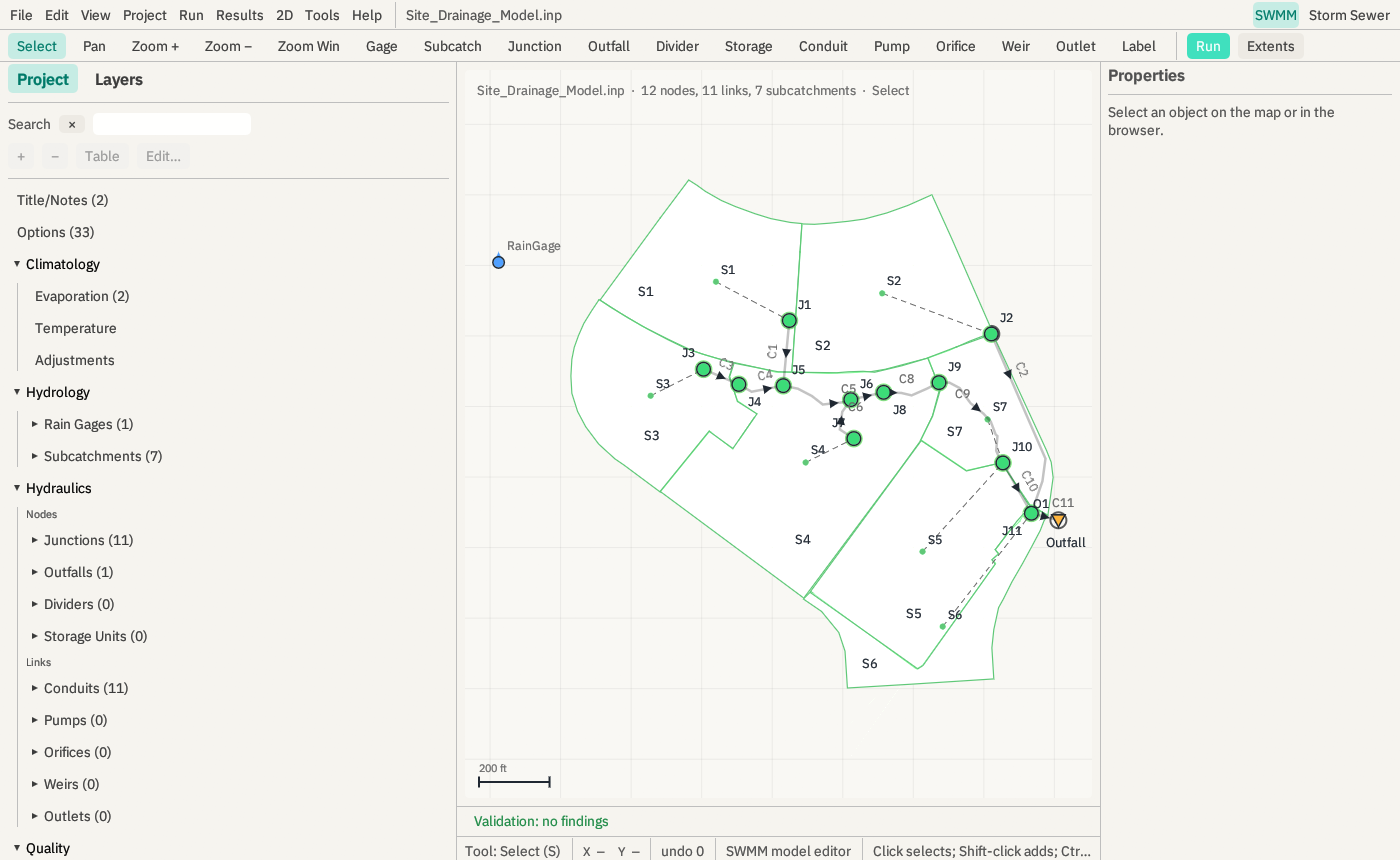
EPA's Site Drainage sample model in the AquaSWMM editor: the project browser lists sections with object counts, the map shows seven subcatchments draining through junctions to an outfall, and the validation bar reads no findings.
EPA's Site Drainage sample model, with the pre-run check reporting no findings.

2D overland flow, coupled to the network

When a manhole surcharges, the water leaves the network, runs over a DEM, ponds, and is captured again downstream.

  • A shallow-water solver on a grid from an ESRI ASCII grid or GeoTIFF: local inertial (Bates et al. 2010, with de Almeida et al. 2012) or full dynamic with an HLL Riemann solver for dam breaks and supercritical flow.
  • Exchange at manholes, inlets, channel banks and outfalls. Tight 1D-2D coupling steps EPA's engine through a bridge (Windows); iterative coupling works with any installed engine.
  • Mesh refinement around interfaces and chosen areas, rain on the grid, Horton or constant-loss infiltration, and building footprints that block flow.
  • Depth, velocity and hazard (depth × velocity) grids on the map under the same time slider as the SWMM results, exported as ASCII rasters.
  • The 2D settings live in a sidecar file beside the model. Your .inp stays EPA's format and still opens in the EPA GUI.

2D results are checked against published benchmarks and against the engine's own flooding totals, not yet against a measured real-world event. Manual: 2D overland flow, equations, numerics and validation.

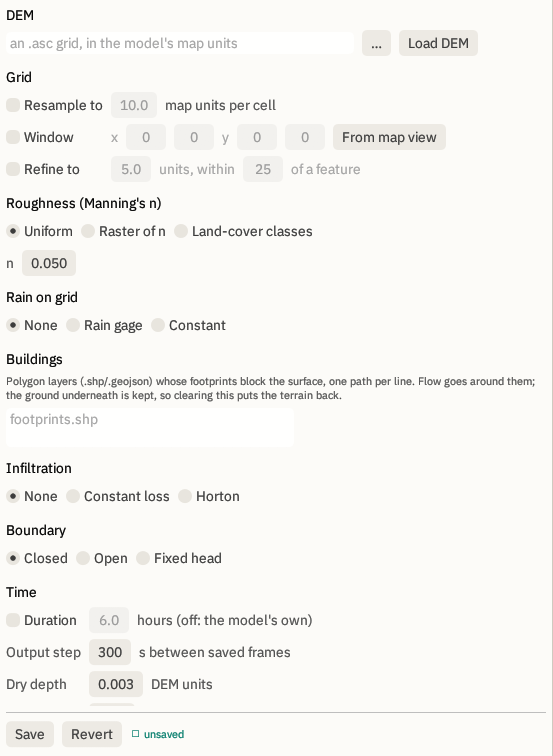
The 2D Setup window: DEM file, grid resampling, window and refinement, Manning's roughness as uniform, raster or land-cover classes, rain on grid, building footprint layers, infiltration, boundary type and time stepping.
2D Setup: the DEM, grid and refinement, roughness, rain, buildings, infiltration, boundaries and time stepping.

Storm-sewer design on the model's own conduits

  • Rational method, Manning with exact circular, box, elliptical and arch geometry, standard-step HGL backwater, HEC-22 access-hole losses and inlets.
  • Catalog auto-sizing against velocity and percent-full criteria, written back into [XSECTIONS] as one undo step.
  • A design review that flags pipes near or over capacity, and a design report in HTML or PDF.
  • U.S. customary or SI in and out; a metric model snaps to the metric RCP series.
  • Imports .stm storm-sewer projects, LandXML pipe networks and DXF, and writes LandXML that Civil 3D imports as a pipe network.

Manual: design panel, methods.

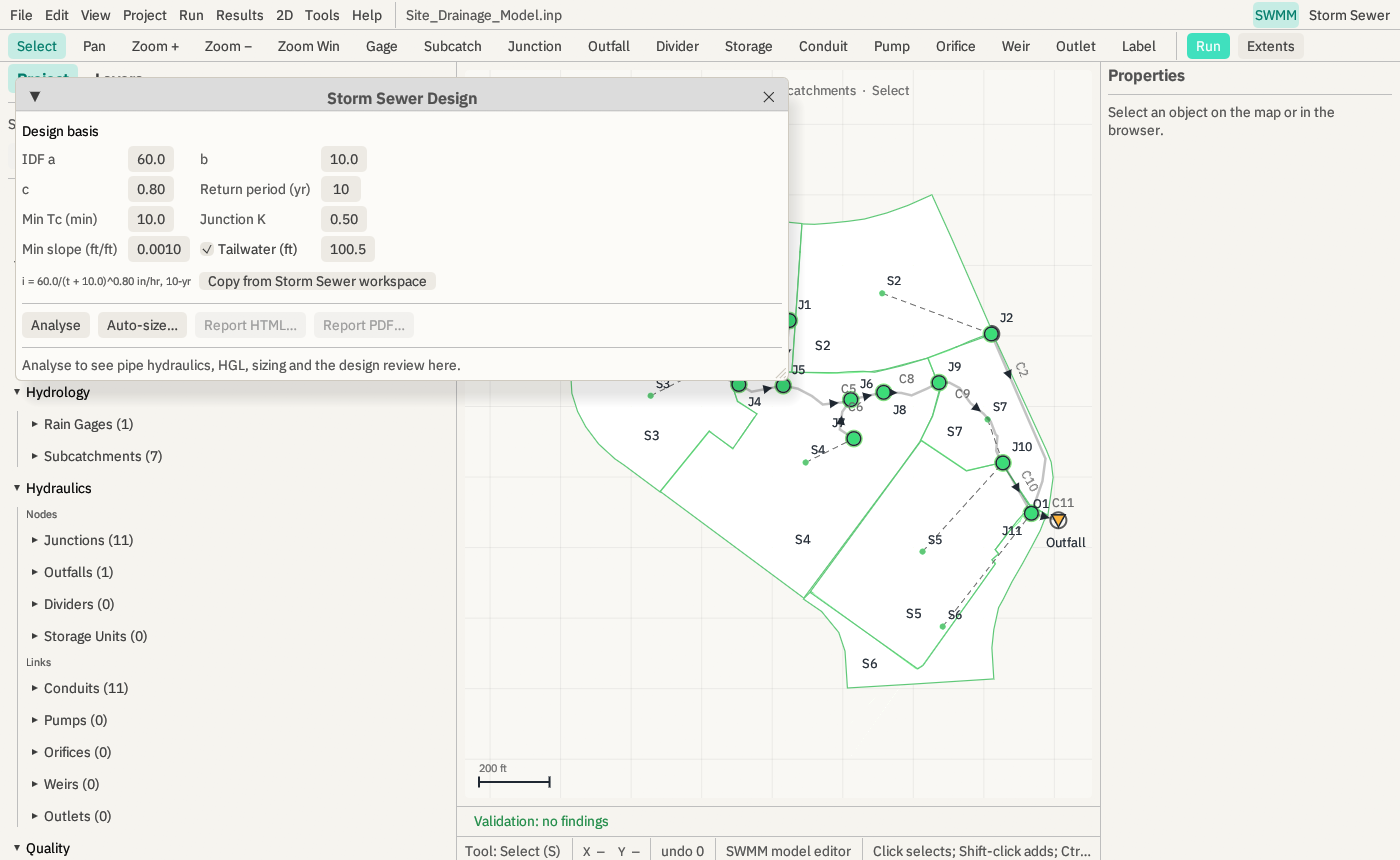
The Storm Sewer Design window open over the SWMM editor, showing the design basis: IDF coefficients a 60, b 10, c 0.80, a 10-year return period, minimum Tc of 10 minutes, junction K of 0.50, minimum slope and a 100.5 ft tailwater, with Analyse and Auto-size buttons.
The design basis sits on top of the open SWMM model. Analyse maps the model and runs the design engine.

GIS in, GIS out

  • Import shapefile or GeoJSON features as junctions, outfalls, storage, conduits or subcatchments through a field-mapping table.
  • Read coordinate systems from .prj files, GeoJSON, GeoTIFF keys or an EPSG code, including every State Plane 1983 zone and every UTM zone.
  • Each of the 122 State Plane zones was checked against PROJ 9.5.1 to within 1 cm.
  • Draw a DEM under the map as a hillshade and set node ground elevations from it.
  • Export the model as a shapefile set or GeoJSON, with the peaks of a loaded run as fields.

Manual: GIS, coordinate systems and DEMs.

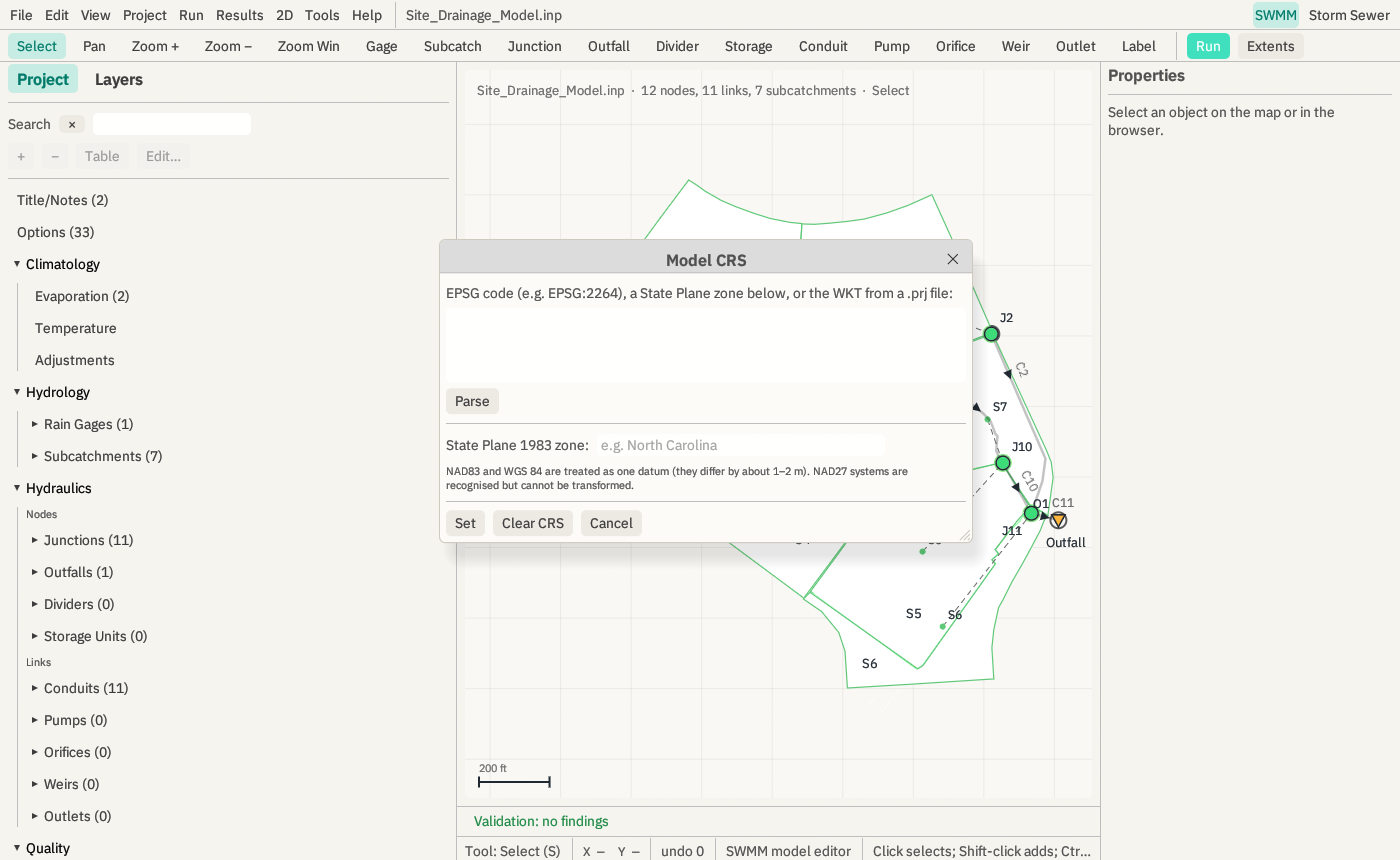
The Model CRS window over the Site Drainage model, accepting an EPSG code, a State Plane 1983 zone or the WKT from a .prj file.
Model CRS: an EPSG code, a State Plane zone, or the text of a .prj.

Results and reports a reviewer can follow

  • Results on the map by any reported variable, with a time slider, time-series and scatter plots, the report's summary tables as grids, and a profile with the HGL and its maximum envelope.
  • Run-to-run and engine-to-engine comparison.
  • A model report in HTML or PDF that names the engine version and binary hash, and lists every input section of the model, row by row.
  • A submittal-shaped design PDF: title block on every page, pipe, structure and inlet schedules, a plan schematic, and a profile with HGL, EGL and the stated vertical exaggeration.
  • CSV and GeoJSON export.

Manual: results views, profile.

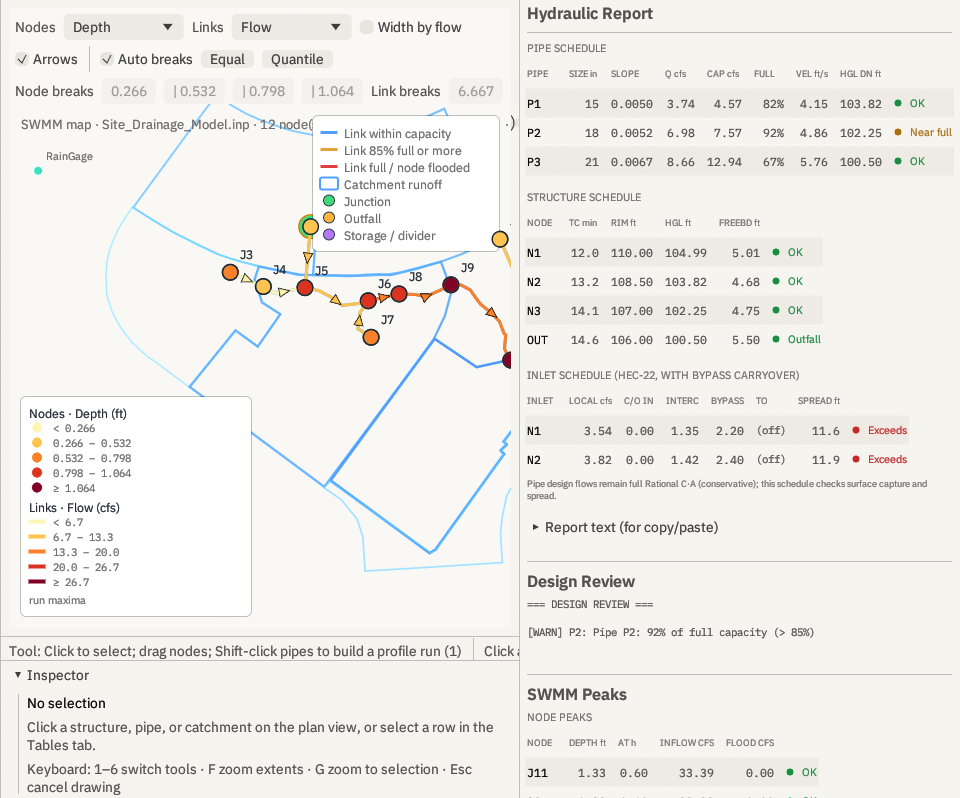
Left: EPA's Site Drainage model on the map with nodes coloured by peak depth and links by peak flow, with a legend of the class breaks. Right: the hydraulic report, with a pipe schedule (size, slope, flow, capacity, percent full, velocity, HGL), a structure schedule with freeboard, an HEC-22 inlet schedule with spread checks, and a design review flagging pipe P2 at 92 percent of capacity.
Left, EPA's Site Drainage model coloured by run maxima. Right, the design tool's schedules and review for its demo network.

A Python terminal next to the model

Tools → Python Terminal runs your own Python with model, out and rpt bound to the last run's files. Anything on your interpreter's path is available: numpy, pandas, swmmio, pyswmm, matplotlib. AquaSWMM imposes no library of its own.

The engine is also a Python module, aquaswmm: Rational, Manning, HGL and whole-network analysis straight into your own scripts.

Manual: Python cookbook.

# From the manual's cookbook: read the header of the
# results file with nothing but the standard library.
import struct

def out_header(path):
    with open(path, "rb") as f:
        f.seek(-24, 2)
        id_off, in_off, out_off, n_periods, err, magic = \
            struct.unpack("<6i", f.read(24))
        assert magic == 516114522, "not a complete SWMM .out file"
        ...

h = out_header(out)
h["n_periods"], h["step_s"], h["ids"]["node"][:5]
Recipe 1 of the Python cookbook, abridged.

Checked by hand, and on every build

A reviewer should be able to reproduce any number AquaSWMM prints. Here is how each part earns that.

The SWMM run is EPA's

AquaSWMM contains no SWMM solver. It runs EPA's runswmm unmodified as a separate process, never links to it or patches its results, and decides success by reading the report, not the exit code. Several engine versions can be registered and chosen per run.

The design engine matches hand calculations

On a reference network, every capacity, flow, velocity and HGL the engine reports is worked by hand and agrees to six decimal places. A test holds those numbers, so a change that moves any of them fails the build.

The 2D solver reproduces known solutions

Lake at rest on a random bed, Manning uniform flow, Ritter's dam break, mass conservation, symmetry and a graded mesh are integration tests with stated thresholds, run on every build.

Reference network excerpt

Manning full-flow capacity and Rational design flow on the reference network, engine against hand calculation
PipeSlopeCapacity, engine (cfs)Capacity, by handDesign Q, engine (cfs)Design Q, by hand
P1, 15 in0.0050004.5677654.5677653.5425103.542510
P2, 18 in0.0052007.5747867.5747866.7865366.786536
P3, 21 in0.00666712.93742512.9374258.4754608.475460

Three pipes down a trunk to a fixed-tailwater outfall, i = 60 / (t + 10)0.8, n = 0.013, Manning K = 1.486.

Read the validation in full, including the 2D benchmarks and what the checks do not establish.

Free engine, paid desktop app

The solver that decides your answer is EPA SWMM 5, which is public domain and free for everyone. AquaSWMM's own engine code — the design methods, the 2D solver, the file readers and the command-line tool — is open source under GPL-3.0.

What you pay for is the desktop app: the editor, the map, the 2D and design tools, GIS, reports and support. That is the part that saves you hours, and it costs a fraction of what incumbent SWMM suites cost.

If a subscription lapses, the app drops to viewer mode: you can still open and view every model and its results and read the manual. Running, saving and exporting pause until you renew. You are never locked out of your own files.

AquaSWMM desktop appPaid subscription, AquaSWMM EULA

Editor, map, 2D setup and results, design panel, GIS, reports, Python terminal.

AquaSWMM engineOpen source, GPL-3.0

Storm-sewer design methods, 2D shallow-water solver, file readers and writers, command-line tool.

EPA SWMM 5Public domain, from the U.S. EPA

Hydrology and hydraulics of the network. Installed from EPA and run exactly as EPA ships it.

Try it on a model you already have

Thirty days, every feature, full support: a 24/7 AI assistant that has read the manual, and a human reply to email within 24 hours. No card.